Shopify Integration with Business Central Full Setup Guide
Summary
Shopify Integration with Business Central Full Setup Guide Shopify integration with Business Central connects your Shopify store with Microsoft Dynamics 365 Business Central so orders, products, inventory, and customers sync automatically.
Shopify Integration with Business Central
Learn how Shopify integration with Business Central works. Step-by-step setup guide for syncing orders, products, inventory, and customers automatically. Running an online store on Shopify often means handling orders, inventory, and accounting in separate systems. This can slow down daily work because data needs to be checked or entered in multiple places. As orders grow, the chances of stock errors, missing invoices, or incorrect customer records increase.
Shopify integration with Microsoft Dynamics 365 Business Central solves this problem by connecting the store with an ERP system. The integration allows products, orders, inventory, and customer data to move automatically between both platforms so teams can manage everything from one place.
What Is Shopify Integration with Business Central?
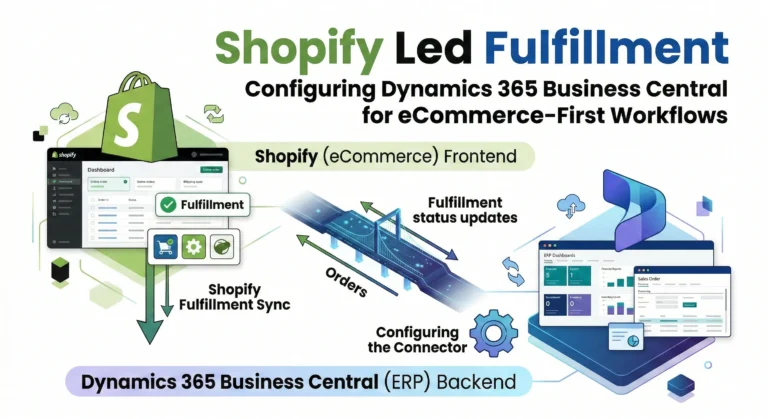
Shopify integration with Business Central means connecting a Shopify store with Microsoft Dynamics 365 Business Central so both systems exchange data automatically. Shopify handles storefront activities like product display and checkout, while Business Central manages accounting, inventory, and order processing.
When integration is active, information moves between both systems without manual entry. Orders placed on the Shopify store appear inside Business Central, where accounting entries, invoices, and inventory updates can be processed.
In most setups, the following data stays synchronized between the two systems:
- Products and product variants
- Inventory levels and stock changes
- Customer information
- Orders and order status
- Shipping and fulfillment updates
- Invoices and financial records
This connection keeps both platforms aligned and reduces manual work across sales and operations.
How Shopify and Business Central Work Together
Shopify and Business Central serve different roles in the business workflow. Shopify acts as the online sales platform, while Business Central manages the backend operations.
When a customer places an order on Shopify, the integration sends the order details to Business Central. The ERP system then processes the order, updates inventory, and records the financial transaction.
The typical process looks like this:
| Process Step | Shopify Role | Business Central Role |
| Product listing | Displays products in store | Stores product data and pricing |
| Order placement | Customer places order | Order record created in ERP |
| Inventory update | Shows available stock | Adjusts stock in warehouse |
| Customer data | Captures customer details | Stores customer records |
| Financial records | Shows order status | Creates invoices and accounting entries |
Benefits of Shopify Integration with Business Central
Businesses often connect Shopify with Business Central to simplify order handling and financial management. Instead of managing information across multiple systems, everything flows automatically between the storefront and the ERP.
After integration, many routine tasks become easier and more reliable.
Key advantages include:
- Automatic order synchronization from Shopify to Business Central
- Real-time inventory updates across store and warehouse
- Centralized accounting and financial reporting
- Reduced manual data entry and fewer mistakes
- Better order tracking and fulfillment visibility
- Consistent customer data across platforms
These improvements help teams spend less time managing data and more time handling orders and customers.
Step-by-Step Shopify Integration Setup
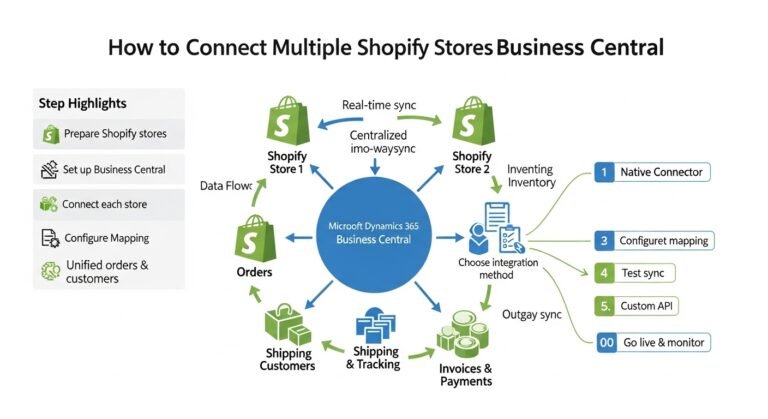
Setting up Shopify integration with Business Central usually involves connecting the Shopify store with the built-in Shopify connector available inside Business Central.
The process is straightforward when the correct configuration steps are followed.
Step1. Create and Prepare Your Shopify Store
Start by setting up your Shopify store with products, pricing, and payment settings. Product names, SKUs, and variants should be properly structured because Business Central uses this information to match products during synchronization.
Step 2. Enable Shopify Connector in Business Central
Inside Microsoft Dynamics 365 Business Central, the Shopify connector can be activated from the extensions or integration settings. This connector allows Business Central to communicate directly with the Shopify store.
Step 3. Connect Shopify Store to Business Central
Once the connector is enabled, you connect your Shopify store by entering the store URL and authentication details. This step allows Business Central to access store data securely.
Step 4. Map Products and Customers
Product mapping ensures items in Shopify match items in Business Central. Customer mapping also ensures that when a new order arrives, the customer record is created or matched correctly.
Step 5. Configure Order and Inventory Sync
Next, configure how orders and inventory will sync. Most businesses set orders to sync automatically while inventory updates are sent back to Shopify whenever stock levels change in Business Central.
Step 6. Test the Integration
Before going live, create test orders in Shopify and confirm they appear in Business Central. Check product updates, stock changes, and invoice generation to ensure everything works correctly.
Once testing is successful, the integration can run automatically.
What Data Syncs Between Shopify and Business Central?
A well-configured integration ensures all important business data stays consistent across both platforms. Each update made in one system can automatically appear in the other.
The most commonly synchronized data includes:
| Data Type | Sync Direction |
| Products | Business Central → Shopify |
| Inventory levels | Business Central → Shopify |
| Orders | Shopify → Business Central |
| Customers | Shopify → Business Central |
| Shipping updates | Business Central → Shopify |
| Invoices | Business Central |
This structure ensures the ERP system always holds the most accurate operational data.
Common Challenges During Shopify ERP Integration
Although Shopify integration with Business Central is reliable, businesses sometimes face issues during setup if configuration details are missed.
Many problems happen due to inconsistent product data or incorrect synchronization settings.
Common challenges include:
- Product SKU mismatches between systems
- Incorrect tax configuration
- Duplicate customer records
- Inventory sync delays
- Order mapping issues
Most of these problems can be avoided by preparing product data properly and testing the integration before launching it in production.
Improve Your Shopify Operations with Business Central Integration
Connecting Shopify with Microsoft Dynamics 365 Business Central can make a big difference in how an online store manages orders, inventory, and accounting. Instead of switching between systems or entering the same data multiple times, the integration keeps everything connected automatically.
At New Wiz Tech, we help businesses connect their Shopify stores with Business Central so products, orders, customers, shipments, and invoices stay synchronized in real time. Our team focuses on practical setups that reduce manual work, improve inventory accuracy, and make daily operations easier to manage as online stores grow.
Conclusion
Shopify integration with Microsoft Dynamics 365 Business Central helps businesses manage their online store and backend operations without switching between systems. Orders, inventory, and customer records stay synchronized, which reduces manual work and improves accuracy. As order volume grows, having both platforms connected becomes even more valuable because teams can track sales, manage stock, and handle accounting from one central place. Businesses that plan to scale their Shopify store often rely on ERP integration to keep operations organized. Need help connecting Shopify with Microsoft Dynamics 365 Business Central? Contact us our team can guide you through the setup so orders, products, and inventory stay synced without manual work .
FAQ’s
What is Shopify integration with Business Central?
Shopify integration with Business Central connects a Shopify store with Microsoft Dynamics 365 Business Central. It allows orders, products, inventory, and customer data to sync automatically between the store and the ERP system.
Does Business Central have a Shopify connector?
Yes, Microsoft provides a built-in Shopify connector for Microsoft Dynamics 365 Business Central. It allows businesses to connect their Shopify store and manage orders, products, and inventory directly inside the ERP system.
Can inventory sync automatically between Shopify and Business Central?
Yes, inventory levels can sync automatically. When stock changes in Business Central, the updated quantity is sent to Shopify so customers always see accurate stock availability.
How long does Shopify Business Central integration take?
The setup time depends on store size and product structure. Most integrations can be configured and tested within a few days if product data and system settings are prepared correctly.