Is Business Central Right for eCommerce Business?
So, is Business Central right for ecommerce business ? It fits best for stores that have outgrown spreadsheets and entry-level accounting tools and now need inventory, orders, and finance in one connected system. If you run one simple storefront with light stock, it may be more than you need. If you sell across several channels, offer B2B pricing, or trade in multiple currencies, it is a strong fit.
Introduction
Every growing online store hits the same wall. Orders live in your platform dashboard, stock lives in a spreadsheet, and your accountant reconciles everything by hand at month end. Someone asks a simple question, like how many units of a SKU are actually available right now, and the answer takes twenty minutes and three tabs to figure out.
I have spent years working with online retailers on exactly this problem, first as an observer of what breaks and later helping teams fix it through Business Central eCommerce integrations. The question I hear most often is some version of this: is my business big enough for an ERP, and is this particular ERP the right one?
Those are the right questions to ask. ERP selection for online retailers is full of expensive wrong turns, and the software vendors will not tell you when their product is a poor fit. The honest answer to ‘is Business Central right for ecommerce’ depends on your operational load, not on a vendor’s brochure. So in this article I want to give you the assessment I wish someone had given me earlier: where Business Central genuinely helps an online store, where it falls short, what it costs, and a practical checklist you can run against your own operation before you spend anything.
What Is Business Central, and Why Are Online Sellers Looking at It?
Microsoft Dynamics 365 Business Central is a cloud ERP aimed at small and mid-sized businesses. It covers finance, sales, purchasing, inventory, and operations in one platform, and Microsoft describes how Business Central manages finance, sales, purchasing, and inventory across a company in its official product materials. It grew out of Microsoft Dynamics NAV, a system that has been around since the 1980s, so under the modern interface sits a very mature accounting and operations engine.
Three things explain why online retailers keep landing on it in their research:
- It is priced for the mid-market, not the enterprise. You license it per user per month rather than through a six-figure enterprise agreement.
- It connects to the rest of the Microsoft stack your team already uses, including Outlook, Excel, and Teams, which shortens the learning curve for finance and operations staff.
- It has a large extension marketplace, plus a native Microsoft connector for Shopify and mature third-party connectors for platforms like WooCommerce and Magento.
That combination, big-company capability at a smaller-company price, is exactly why it shows up on every shortlist when someone searches for the right ERP for a growing store. But price and brand recognition are not the same as fit, which brings us to the real question.
Is Business Central Right for Ecommerce? My Honest Take
Here is the short version of my suitability assessment. Business Central is the right call when your bottleneck is operations: stock accuracy, order handling, and financial visibility across channels. It is the wrong call when your bottleneck is the storefront itself, because Business Central is not a website, a checkout, or a marketing tool.
The pattern I see in successful projects looks like this. A store starts on a platform like Shopify, WooCommerce, or Magento, and the platform handles the front end well. Behind it, the business runs on QuickBooks or Xero plus a pile of spreadsheets. That arrangement works until complexity arrives, and complexity arrives in predictable forms: a second sales channel, a B2B arm with negotiated prices, a warehouse that no longer fits in one spreadsheet tab, or an accountant drowning in manual journal entries.
When those show up, the store does not need a better website. It needs a single source of truth behind the website. That is the job an ERP does, and it is the job Business Central does well for this size of business.
So when people ask me whether Business Central is right for their ecommerce business, my answer is almost always a question back: where is your operational pain, and how much of it is happening behind the storefront? The rest of this article turns that question into a checklist you can actually score.
What an eCommerce Business Actually Needs from an ERP
Before judging any system, it helps to be clear about the ecommerce ERP requirements in the first place. In my experience, an online retailer needs six things from the back office:
- Accurate, near real-time inventory. Stock levels in the ERP and on the storefront must match, or you oversell and disappoint customers.
- Automated order flow. Online orders should land in the ERP without anyone retyping them, then flow through to fulfilment and invoicing.
- Channel-aware pricing. Retail prices, promo prices, B2B price lists, and customer-specific agreements all need to stay in sync with whatever the storefront shows.
- Solid financials. Revenue recognition, cost of goods, VAT and sales tax, and multi-currency handling done properly, not bolted on.
- Shipment and status updates flowing back. Customers and your support team should see the same order status the warehouse sees.
- Reporting you can trust. Margin by product and channel, not just a profit and loss statement assembled after the fact.
Any ERP you evaluate should be scored against that list. Business Central covers all six natively on the finance and inventory side, and covers the storefront-facing parts through connectors, which is the part you need to scrutinize, because that is where fit varies most.
Signs You Need an ERP (and Not Just Better Spreadsheets)
Not every store needs one yet. Here are the signs I look for when a team asks me if it is time. If three or more of these sound familiar, an ERP conversation is reasonable. If none do, congratulations, stay on your current setup and spend the money on marketing.
- You sell on two or more channels and reconcile stock between them by hand.
- Overselling or phantom stock has caused real cancellations, refunds, or embarrassed support tickets.
- Orders get retyped from the platform into your accounting system, or your bookkeeper spends days each month on manual entries.
- You cannot answer “what is our true margin on this product, this month?” without a custom spreadsheet project.
- B2B customers ask for their own pricing and you maintain it outside your main system.
- You have outgrown QuickBooks or your accountant has told you, gently, that it has outgrown you.
- Peak season requires hiring people whose main job is copying data between systems.
- You want to open a new market or currency and suspect your current setup cannot handle it.
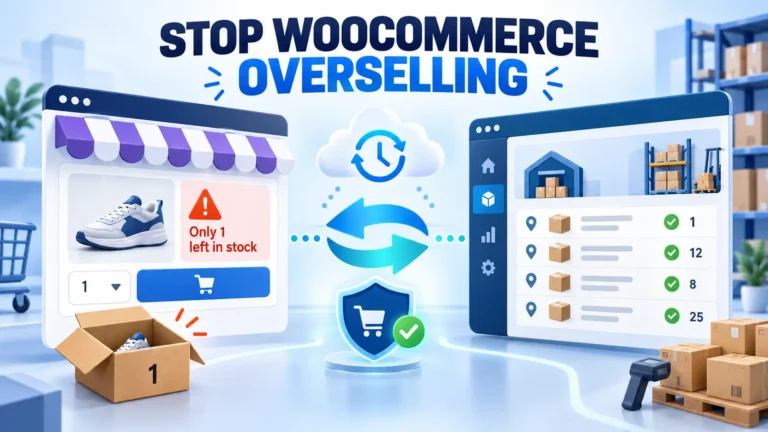
There is a specific flavor of this I see constantly with WooCommerce stores: stock drifts between the store and the back office, overselling follows, and the fix people reach for, manual audits, treats the symptom. We wrote separately about how to stop overselling inventory between WooCommerce and Business Central if that is your situation. The broader point stands: repeated manual reconciliation is one of the clearest signs you need an ERP, because it means your systems disagree about basic facts.
Where Business Central Fits eCommerce Operations Well
Now the positive case. When I weigh ‘is Business Central right for ecommerce’ for a specific store, these are the areas where it earns its keep in my experience.
Inventory that is actually accurate
Business Central tracks stock at the item and location level, with bins, variants, and units of measure handled properly. When a connector pushes availability to your storefront on a schedule or in near real time, the number on the product page and the number your warehouse team picks against come from the same source. That single change eliminates the majority of overselling complaints I hear about.
Orders that enter the system once
A well-built integration turns a storefront order into a Business Central sales order automatically, carrying the customer, items, quantities, taxes, and payment reference with it. Nobody retypes anything. Refunds and cancellations flow back the same way. The time savings are real, but the bigger win is that order data stops mutating between systems.
Finance that closes on time
This is the unglamorous reason most ERP projects actually get funded. Business Central handles the general ledger, payables, receivables, cost of goods, and multi-currency properly, and your storefront transactions post into it. Month-end stops being a reconciliation project. If you have an accountant or CFO, this alone often justifies the move.
Multi-channel, B2B, and multi-currency as standard
Selling the same catalog retail and B2B, in more than one currency, through more than one storefront, is where lighter tools buckle. Business Central treats these as configuration rather than workarounds: multiple price lists, customer-specific terms, currencies with proper exchange-rate handling. If your roadmap includes a second store, a wholesale arm, or a new region, this matters more than almost anything else. If Shopify is your platform, Microsoft maintains an official connector, and we have practical notes on how to connect multiple Shopify stores to Business Central. For the official view of the mechanics, Microsoft’s training module on syncing items and inventory between Business Central and Shopify walks through item, price, and inventory sync step by step.
Reporting and the wider Microsoft ecosystem
Because the operational data and the financial data live in one database, margin by channel or per SKU is a query, not an archaeology project. Power BI plugs in directly for dashboards, and Copilot features are being layered on for analysis and drafting. For teams already living in Microsoft 365, this reduces the “yet another system” resistance you otherwise get. If you want a feel for the breadth before any demo, Microsoft’s official overview of Business Central capabilities is the best neutral starting point.
Business Central Pros and Cons for Online Retailers
You should also see the other side, because the business central pros and cons picture has a cons column that vendors undersell. This list is the other half of the ‘is Business Central right for ecommerce’ equation, stated plainly.
The pros:
- Genuine ERP depth: finance, inventory, purchasing, and warehousing in one system, without enterprise pricing.
- Cloud-based, so updates, backups, and infrastructure are Microsoft’s problem, not yours.
- Strong connector ecosystem: the native Shopify connector plus mature third-party options for WooCommerce, Magento, and others.
- Scales from roughly ten users to several hundred without a re-platform.
- The Microsoft 365 and Power BI integration shortens training for non-technical staff.
- A large partner network, so you are not locked to a single vendor for support.
The cons, stated plainly:
- It is not a storefront. You still need Shopify, WooCommerce, Magento, or similar, and the ERP only adds value through the quality of the connection between the two.
- Implementation is a project, not a purchase. Expect data migration, connector setup, testing, and training. A serious store should budget weeks of effort from its own team, not just the partner’s.
- Licensing is only part of the cost. Partner services for setup, customization, and ongoing support are a real and variable line item.
- The interface is dense compared to a modern SaaS dashboard. It is a tool for operations people, and some of your team will need time with it.
- Out of the box, its warehouse features cover most needs but not the deepest third-party logistics scenarios; heavy warehouse operations sometimes add a specialized extension.
- Connector quality varies. The Shopify connector is well supported; for other platforms, the third-party connector you pick determines the experience.
That last point deserves emphasis. The ERP is half the equation; the integration is the other half, and it is where most disappointed expectations come from. Evaluate the connector as seriously as the ERP.
How Much Does Business Central Cost for an Online Store?
Money is usually where the ‘is Business Central right for my ecommerce’ question gets decided, so let me keep the licensing math public and straightforward. Business Central pricing starts at $80 per user per month for the Essentials plan, paid yearly, with the Premium plan at $110 per user per month for businesses that need manufacturing or service management. Light users, people who only approve things or look at reports, can be licensed as Team Members at $8 per user per month. Microsoft also offers a free 30-day trial if you want to poke around before talking to anyone. For context, the Census Bureau reported that e-commerce accounted for 17.1 percent of total US retail sales in the second quarter of 2026, a share that keeps climbing, straining manual back offices further.
For a typical ecommerce team, only a handful of people need full licenses: your operations lead, your finance person, maybe your warehouse manager. Everyone else touches the system through the storefront or through reports, which means the monthly license bill is often smaller than buyers expect.
The honest caveat is everything beyond licensing. Implementation involves data migration, connector configuration, mapping taxes, payment methods, and shipping rules, plus training. Those partner costs vary enormously with scope, so get quotes from more than one partner before you commit, and make them quote the full first-year cost, not just the license.
One more cost note in the other direction: businesses that qualify can run the trial, and Microsoft reports that over 55,000 small and medium-sized businesses run on Business Central, which gives you a large community and talent pool to hire from. Migration from common starting points is a well-worn path, and moving off QuickBooks, the most common origin for the retailers we work with, is close to a routine exercise these days.
Business Central Compared to the Alternatives
ERP selection for online retailers usually comes down to four realistic options, so let me place Business Central among them honestly.
Staying on QuickBooks plus spreadsheets. Cheapest option, and the right one for small, single-channel stores with simple stock. It stops being right the moment channels multiply or B2B enters the picture, because nothing reconciles itself.
NetSuite. The most common enterprise-grade alternative, deeper out of the box in some areas, and considerably more expensive to license and implement. At smaller sizes, many teams find they are paying for capability they do not use.
Your ecommerce platform’s native tools. Shopify’s own order and inventory management, for example, works well within one ecosystem. The friction starts when accounting-grade financials, multi-entity setups, or non-Shopify channels enter.
Adobe Commerce and similar commerce-first platforms. These handle the storefront side superbly, a scope Adobe’s commerce product materials describe well, and they pair with an ERP behind them rather than replacing one. The pairing question, which ERP sits behind the storefront, is exactly the decision this article addresses.
Where does that leave Business Central? In my view it occupies the sensible middle: far more operational and financial structure than QuickBooks, far less cost and complexity than NetSuite, and platform-agnostic on the storefront side. That middle is where most growing online retailers actually live.
An ERP Readiness Checklist for Growing Stores
Before signing anything, run your operation through this ERP readiness checklist. I use a version of it on first calls.
- Count your channels. Two or more, or one plus B2B, is the classic ERP trigger.
- Measure your reconciliation time. Hours per week spent matching systems is your cost of doing nothing.
- Check your overselling record. If stock errors reached customers last quarter, the manual era is ending.
- Ask about month-end. If closing the books takes more than a few days because data is scattered, finance will thank you for moving.
- List your currencies and entities. More than one of either pushes you toward a real ERP.
- Name your data owner. Someone must own item data, pricing, and mappings. ERP projects without an owner stall.
- Confirm your storefront’s integration options. Shopify, WooCommerce, Magento, and others all connect, but confirm the specific connector quality for your platform first.
- Get leadership to commit time. The software is the smaller half of the project; your team’s involvement decides the outcome.
Score honestly. If you fail items one, three, and four, you are ready. Run this before every demo, because it answers ‘is Business Central right for my ecommerce’ faster than any sales call. If you pass all eight comfortably, you have time, and there is no shame in revisiting this next year.
What Implementation Actually Looks Like
Teams deserve a realistic picture here, because surprise is the enemy of ERP projects. A straightforward single-channel integration with clean data can wrap up in a few weeks. Multi-channel setups with B2B pricing, custom workflows, or messy historical data typically run a few months. Anyone promising you certainty in one sentence, in either direction, is guessing.
The sequence is consistent: scope and design, data migration, connector configuration, testing with real orders, then go-live with a support window. The single biggest predictor of a smooth project, in my experience, is the quality of the partner and the honesty of the scope, which is why we tell every prospect to read our guidance on choosing the right Business Central implementation partner before signing with anyone, including us. Ask candidates for reference customers in ecommerce specifically. Retail ERP and manufacturing ERP share a name but not a rhythm; peak season waits for no implementation timeline.
Common Mistakes eCommerce Teams Make When Choosing an ERP
A short list of avoidable errors, all of which I have watched happen:
- Buying for what you might become. License for who you are this year. Enterprise features you “might need in five years” are a subscription to regret.
- Skipping the pilot questions. Ask to see the exact connector, with your platform, during the sales process, not after.
- Treating data cleanup as optional. Every duplicate SKU and stale price migrates faithfully. Clean before you move.
- Leaving finance out of the decision. The team that closes your books will live in this system daily. If they were not consulted, the project will stall.
- Underestimating training. Budget real hours for your team. Adoption, not software, decides success.
- Signing a scope written in vagueness. If the proposal does not say who builds each mapping and what “done” looks like, it is not a scope.
Key Takeaways
- Business Central is a back-office ERP, not a storefront, and it fits stores whose pain is operational rather than visual.
- The classic readiness signals are multiple channels, overselling, manual reconciliation, and slow month-end closes.
- Licensing is transparent at $80 per user per month for Essentials; implementation effort is the variable to manage.
- The connector between your storefront and the ERP deserves as much scrutiny as the ERP itself.
- A short readiness checklist, scored honestly, beats a vendor demo for making this decision.
Frequently Asked Questions
Is Business Central right for ecommerce businesses that sell on only one channel?
It can be, but it is not automatic. A single-channel store with simple stock and few orders is usually fine on lighter tools. The case strengthens when that one channel has B2B customers, deep inventory, heavy order volume, or accounting pain. Ask whether the bottleneck is operations or marketing before deciding.
How much does Business Central cost per month for a small eCommerce team?
Essentials licenses run $80 per user per month and Premium runs $110, paid yearly, with light-access Team Member licenses at $8. A small team often needs only a few full licenses, so monthly licensing can be a few hundred dollars. Implementation and support are separate and vary by partner and scope.
Does Business Central connect to Shopify, WooCommerce, and Magento?
Yes. Microsoft ships a native Shopify connector, and mature third-party connectors exist for WooCommerce, Magento, OpenCart, nopCommerce, and Shopware. Connector depth varies by platform, so evaluate the specific connector for your storefront, including how it handles inventory, pricing, orders, and shipment updates, before committing.
Can Business Central handle multi-currency and B2B pricing?
Yes, both are core capabilities rather than add-ons. Multiple currencies with exchange-rate handling, multiple price lists, customer-specific pricing, and separate B2B workflows are standard features. This is one of the strongest reasons multi-channel and wholesale-leaning retailers choose it over lighter accounting tools.
Do I still need QuickBooks if I move to Business Central?
No. Business Central replaces QuickBooks as your financial system of record, and your storefront transactions post directly into it. Most teams migrate their chart of accounts, open items, and item records during implementation, then retire QuickBooks. Keeping both running long-term usually recreates the reconciliation problem you were escaping.
How long does a Business Central implementation take for an online store?
It depends on channels, customization, and data quality. A clean single-channel project can finish in a few weeks; multi-channel builds with B2B pricing or heavy customization commonly take a few months. Ask prospective partners for an ecommerce reference with a similar footprint to yours, and treat vague timelines as a warning sign.
Is Business Central too complicated for a small team?
The interface is denser than a modern storefront dashboard, but small teams run it successfully every day, especially when light users are licensed as Team Members and see only what they need. Training and a good partner setup matter more than team size. Most teams feel competent after their first full order-to-cash cycle.
What is the difference between Essentials and Premium for an ecommerce seller?
Premium includes everything in Essentials and adds service order management and manufacturing. Most online retailers do not need either, so Essentials is the common choice. Premium becomes relevant when you manufacture your own products or run field service operations alongside the store. When in doubt, start with Essentials and confirm with a partner.
Can Business Central replace my warehouse management system?
For many stores, yes: locations, bins, picks, shipments, and basic warehouse documents are built in. Very high-volume operations or complex third-party logistics scenarios sometimes add a specialized warehouse extension from the marketplace. Assess your pick-and-pack complexity honestly during scoping rather than assuming either answer.
When is Business Central not the right choice?
When your problem is the storefront itself, when you are a very small single-channel store with simple books, or when you cannot commit internal time to the project. An ERP amplifies an operation that is ready for one; it cannot substitute for the team hours that any implementation requires.
Conclusion
So, is Business Central right for ecommerce in your specific case? If your store has outgrown copy-paste operations, if stock accuracy and order flow are eating hours you would rather spend growing, and if you can commit a small, focused team to a few weeks of setup, it is one of the strongest back-office choices available at this price. If none of that describes you yet, stay lean and check back in a year; the system will still be there.
The next step is a short one. List your channels, your reconciliation hours, and your month-end headaches, then talk to a partner who works with online retailers specifically and ask the uncomfortable questions from this article. If you want that conversation with a team that does nothing but Business Central and ecommerce integration, our Business Central services page is a good place to start, and we are happy to give you a straight assessment either way.